


NVIDIA GTC
3.613.00 Reviews
App Specs
- Version
- 10.0.8
- Updated On
- License
- Free
- Downloads
- 50,000+
- Developer
- NVIDIA
- Categories
- Events
- Platform
- Android
Screenshots
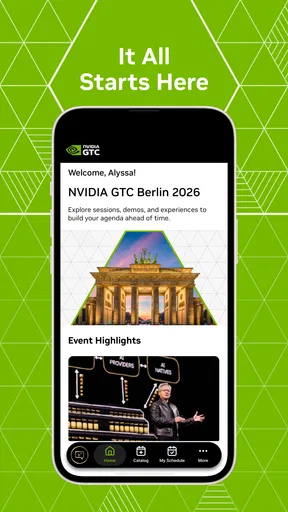
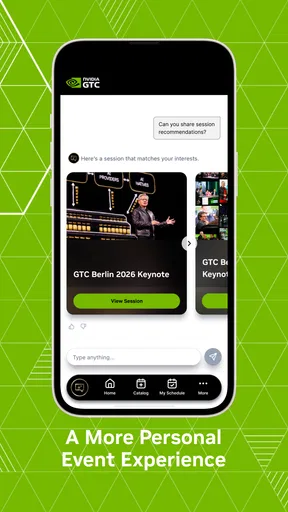
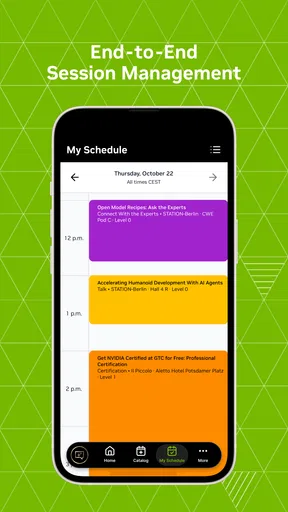
 Analysis by AppCompare
When I judge the NVIDIA GTC app, I start with a practical question: does it help me make sense of a packed technology event without turning my phone into another source of stress? It is a free events app from NVIDIA, and its focus is the company’s GTC conference. That narrow purpose is also its clearest strength. If I am interested in the sessions and people connected with GTC, I have a reason to keep it nearby; if I want a general tech-news feed, I would look elsewhere.
How quickly can you get to the useful parts?
For a conference companion, speed is less about launching in a race and more about finding the next useful session before the day moves on. The app is intended to bring GTC event information together on a phone, so the value comes from reducing the need to jump between scattered notes and event pages. I would use it as a focused reference point rather than assume it replaces every other source of information about the conference.
A useful approach is to decide what you want from the event before browsing deeply. For example, I might be looking for talks that connect to a project I am working on, or simply trying to understand a topic that is new to me. That gives the session list a purpose and makes it easier to avoid opening items just because they look interesting. With a conference centered on technical subjects, a little advance prioritizing can make a bigger difference than hurriedly collecting a long queue of sessions.
The app is currently at version 10.0.8, and it requires iOS 11 or later. That gives iPhone and iPad users a clear baseline to check before installing. It is also worth thinking about the practical conditions in which you will use it: navigating an event while moving between rooms is different from calmly exploring on a couch. I would take a moment before the day begins to get familiar with the layout, rather than learning where everything is while trying to get somewhere on time.
When conference use gets demanding
GTC use can become intense when several sessions seem relevant or plans change during the day. I would treat the phone app as a planning aid, not as a promise that every detail will stay in my head. A small, deliberate shortlist is more useful than trying to track every possible talk. If a session catches my attention unexpectedly, I can reconsider the plan then instead of filling the schedule so tightly that there is no room to adapt.
There is also a trade-off between convenience and attention. Checking an event app repeatedly can interrupt a useful conversation or make a live session feel like a task to manage. I would review my choices at natural breaks—before the day starts, between sessions, or while waiting—rather than keep reaching for the phone during every talk. That habit keeps the app helpful without letting conference logistics crowd out the actual content.
Reliability, audience, and sensible expectations
NVIDIA GTC is aimed at people who want to follow the conference, especially attendees and those interested in its technical themes. It is not the first app I would choose for someone who mainly wants broad, independent coverage of technology events. A general event directory can be a better starting point when you are comparing conferences; NVIDIA’s own app makes more sense when GTC itself is the reason you are looking.
Worth Reading Before You Choose

EA SPORTS FC Mobile 26 Is a Bigger Football Game, but It Takes Time

Flipboard Shows What News Apps Must Do Beyond the Feed

Switching to Android Auto Means Rethinking Your Driving Routine

Google Calendar Makes a Crowded Week Easier to Manage

Ludo King Makes the Most of the Minutes Between Plans

Baby Panda World Brings Quick Play to Modern Phones, but Its Game Library Feels Busy
I would also keep expectations measured around stability and recovery. An app can be convenient when everything is going smoothly, but event-day usefulness depends on being able to reopen it and find the information you need without fuss. I would check my plans before leaving a reliable connection and keep essential details in a separate note if a missed session would matter. That is a sensible backup for any mobile event companion, not a claim that this app has a particular failure problem.
The app has an average rating of 3.6 from about 136 ratings, alongside 13 written reviews, and has passed 50,000 installs. Those figures suggest a real audience, but they do not tell me whether it will suit every attendee’s routine. I would weigh its focused GTC purpose more heavily than popularity: the right question is whether you want a phone-based companion for this particular event.
What Exactly is NVIDIA GTC?
So, first things first, what is this app all about? NVIDIA GTC, or the NVIDIA GPU Technology Conference, is your go-to app for accessing all the content from NVIDIA's renowned conferences. Whether you're a developer, researcher, or just a tech aficionado, this app lets you explore a treasure trove of insights, demos, and talks from experts in AI, deep learning, and more.
Features That Make NVIDIA GTC Stand Out
One of the coolest things about this app is how user-friendly it is. You can easily browse through a vast library of sessions and talks. The interface is sleek and intuitive, making it super easy to find exactly what you're looking for.
Another feature I love is the ability to personalize your experience. You can customize your schedule, bookmark your favorite talks, and even set reminders so you don’t miss out on any live sessions. It's like having your very own personal conference planner in your pocket.
And let's not forget the networking! The app includes interactive features that allow you to connect with other attendees. It's a great way to meet like-minded individuals and maybe even spark some collaboration opportunities.
Why You Should Download It
If you're still on the fence about downloading NVIDIA GTC, let me give you a few more reasons. First, the content is simply top-notch. You get insights directly from industry leaders and pioneers in technology. It's like having a front-row seat to the future of tech.
Plus, the convenience factor is unbeatable. Whether you're on the go or relaxing at home, you can access all the conference content right from your smartphone or tablet. No need to worry about missing out on valuable information because it's all right there, at your fingertips.
My Personal Take
Now, I’ve gotta be honest, as someone who loves keeping up with the latest tech trends, this app is a game-changer. It's packed with so much valuable content that it's almost overwhelming—in a good way! I found myself diving into sessions I didn’t even know I was interested in, and coming away with new knowledge and ideas.
Sure, like any app, it has its learning curve, but once you get the hang of it, navigating through the sessions becomes second nature. I’ve picked up so many tips and tricks that I’m already using in my own projects.
In conclusion, if you’re passionate about technology and innovation, NVIDIA GTC is a must-download. It's an incredible resource that will keep you informed and inspired. So why wait? Check it out and let me know what you think!
A realistic way to use it during a busy day
Imagine I am attending GTC while also keeping up with messages and other everyday commitments. The evening before, I would browse for sessions tied to one concrete question—perhaps how a technical idea might affect a project—then mark only the talks I genuinely hope to attend. In the morning, I would check that shortlist and leave breathing room between choices. If a conversation after one session leads me toward a different topic, I can adjust rather than feel locked into an overfilled plan.
That workflow makes the app most useful as a lightweight organizer. A bookmark is valuable when I want to revisit a session later, while a reminder can help when I am focused on something else and do not want to rely on memory. I would still avoid treating either as a substitute for checking the day’s plan: conference schedules can be busy, and a quick review before heading to the next activity is a simple way to catch a change in my own priorities.
Who benefits most—and who may prefer another option?
Developers, researchers, students, and technology professionals who specifically want to follow GTC are the natural audience. The app’s event-centered approach suits someone who wants a mobile place to organize conference participation and explore its technical material. It can also work for a curious attendee who does not have a narrowly defined specialty, since browsing may lead to sessions outside their usual interests.
On the other hand, I would skip it if I wanted a year-round source of balanced technology coverage or a tool for managing several unrelated conferences. A general calendar or event-discovery service is better for comparing dates and venues across many organizers. For taking detailed notes, a dedicated notes app may be more comfortable; for a quick personal plan, the GTC app’s event focus is the more direct fit. These tools solve different problems, so I would choose based on whether my priority is conference-specific organization, broad discovery, or long-form note-taking.
Small habits that make the experience smoother
One non-obvious benefit of making a short schedule is that it helps me notice what I am giving up. If two sessions compete for attention, I can decide whether one is essential to attend live and whether the other is something I can explore later through the conference material available in the app. I would not assume every session has an identical format or availability; instead, I would use the app to identify my choices and make a deliberate call when the schedule forces a trade-off.
I would also separate “interesting” from “useful now.” A talk can sound compelling but have little connection to what I need this week. Saving everything creates a backlog that becomes hard to revisit, while a small number of purposeful bookmarks gives me a realistic follow-up list. For a technical event, I find that especially helpful: I can keep one or two exploratory sessions without letting them bury the material most relevant to my work.
For people attending with colleagues, the app can support coordination without replacing a conversation. I would agree on a couple of shared sessions, then leave each person room to pursue separate interests. That prevents the group from spending every break negotiating the next move, while still giving everyone a common point to discuss afterward. The app’s attendee-oriented character is useful here, but the actual value comes from using its event planning in a way that fits the group rather than expecting the software to make decisions for us.
Device fit and final performance verdict
The app is free and rated for Everyone, so the main compatibility check for an iPhone or iPad owner is the stated minimum of iOS 11. I would also consider the age and general condition of my device before relying on any event app through a full day. A phone with limited battery or little free space can make a busy conference harder regardless of which app is open, so I would charge ahead of time and avoid carrying unnecessary background tasks if I needed the device for navigation and scheduling too.
I cannot infer speed, battery use, or stability from the app’s version number alone, and I would not promise that it feels identical on every device. My practical expectation is modest: it should be treated as a focused companion whose usefulness depends more on clear preparation and sensible phone habits than on constant checking. If it opens and presents the information I need when I pause to consult it, it has done its job; if my phone is older or I need a guaranteed backup for a critical appointment, I would keep the essential plan somewhere else as well.
Overall, I would recommend NVIDIA GTC to someone whose plans genuinely revolve around NVIDIA’s conference. Its strongest case is not that it replaces every event or productivity tool, but that it gives GTC attendees a dedicated way to explore sessions and organize their attention. The app has a specific audience, and that focus is a benefit when it matches your plans and a limitation when it does not. If you are heading into GTC with a few clear goals, I think it is worth trying; if you are only looking for general tech reading, a broader source will serve you better.
Pros
- High-quality streaming for smooth gameplay.
- Wide range of supported games and platforms.
- User-friendly interface enhances experience.
- Regular updates with new features.
- Low latency ensures responsive controls.
Cons
- Requires a stable internet connection.
- Subscription model may not suit all budgets.
- Limited offline gaming options available.
- Occasional compatibility issues with certain devices.
- High data usage can affect mobile plans.
FAQs for NVIDIA GTC
What is NVIDIA GTC and what can I expect from the app?
NVIDIA GTC is the official app for the GPU Technology Conference, offering users access to a wide range of resources, sessions, and networking opportunities related to AI, deep learning, and more. Users can expect to explore cutting-edge technology content, interact with industry leaders, and customize their event schedules.
Is the NVIDIA GTC app available on both Android and iOS devices?
Yes, the NVIDIA GTC app is available for both Android and iOS platforms. Users can download it from the Google Play Store for Android devices or the Apple App Store for iOS devices, ensuring accessibility across a wide range of smartphones and tablets.
What features does the NVIDIA GTC app offer to enhance my conference experience?
The NVIDIA GTC app offers features such as personalized scheduling, live streaming of sessions, interactive Q&A, and networking tools. Users can browse through a vast catalog of sessions, set reminders, participate in live discussions, and connect with other attendees and speakers seamlessly.
Do I need an NVIDIA account to use the GTC app, and is there a cost involved?
Yes, users need to create an NVIDIA account to access the full functionality of the GTC app. However, downloading and using the app is free of charge. Some sessions or content within the app may require separate registration or fees, depending on the event specifics.
Can I access recorded sessions on the NVIDIA GTC app after the conference ends?
Yes, the NVIDIA GTC app allows users to access on-demand content, including recorded sessions, after the conference concludes. This feature ensures that attendees can revisit sessions they missed or want to review, providing flexibility in managing their learning experience.


